SimpliFone - Desktop
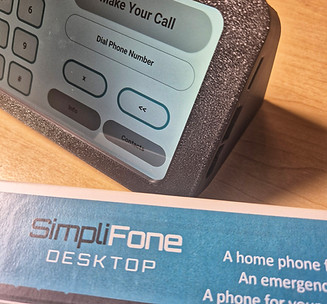
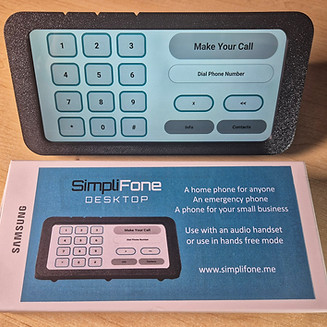
The SimpliFone Desktop device gives you a telephone solution that looks and behaves just like a desktop landline device.
Now you can have a telephone for your home or business so you don't have to give out your private mobile number.
This is an ideal solution if you want to be able to contact the children at home, reach the house sitter or domestic worker at your house, have a shared phone for your business with its own phone number or be able to give your senior citizen parent a phone for the house or room that works like the phones they used all their lives.
Because the SimpliFone is a locked down "telephone only" device it is perfect as a phone for elderly people that get confused by the multitude of apps and features of smartphones, as a second phone for the home or as a phone for the children to use (safe from online influences, social media, Tik Tok, YouTube etc)
Simplifone is a "single app" device that automatically and only runs the Simplifone app, so no user selection is required and this means that when the phone is switched on, the SimpliFone telephone functionality is immediately visible and usable.
When the phone is switched on for the first time, the user can immediately start using it to make or receive calls. And the user only needs to dial "1234567890" to enter the setup menu and use a simple process that allows the selection of language and colour scheme, the setting of some control parameters to help prevent or manage certain functionality, the addition of contacts and owner info and the selection of a ring tone and the secret access code needed to make more changes in the future.
The idea is that the setup process will be completed by the person providing the phone, not necessarily the person that is going to be using the phone and if this is the case, then the access code that is needed to change settings again later, can be changed to prevent settings from being accessed and changed.
When the setup process has been completed, the SimpliFone telephone functionality is shown to the user.
Functionality is very similar to a standard landline telephone and the dial pad can immediately be used when the screen is on. Taking the landline telephone reference a little further, the screen being on is the equivalent of the handset of the landline being lifted. So an incoming call to the SimpliFone when the screen is on, will be rejected and the caller will be informed that the line is busy or not available. This ensures that users are not confused by an incoming call when they are in the process of making an outgoing call.
To make a call, the user simply dials the number and the call is automatically initiated - no need to press another "green dial button" to make the call.
On the main screen, the contacts button provides a screen showing the 10 possible saved contact numbers and a simple tap on the selected contact will result in the SimpliFone instantly initiating a call to that saved number. The contacts are programmed into the ten possible locations during the setup process and Contact # 1 can be flagged as an emergency number, which then makes the contact red in the list, making it easy to find.
The Info screen (accessed by a simple tap of the “Info” button on the main screen) gives the user a clear view of things like the battery strength and the signal strength and provides a one touch option to check the balance on their account if they are using a pre-paid SIM card.
Incoming calls, like the in-call activity of outgoing calls, are also handled in a simple and clear manner, making it easy for the user to see who is calling and to accept or decline the call.
The interface also offers an easy to find speaker-phone button which can be toggled back to a private call if so required.
Additional safety controls also include the fact that the setup process provides for functionality that restricts outgoing calls to only the numbers in the contacts list and it also includes functionality to restrict incoming calls to be allowed only from numbers in the contacts list.
The setup process also provides functionality that prevents the ringer volume and the earpiece volume from being turned off (especially by accident) if so required.
In summary - the SimpliFone Desktop device is a beautiful and modern looking desktop telephone that is a really easy to use, super reliable phone that can stay connected to the charger so it is always in the same place. It provides "landline" type functionality and can be used in hands free mode or with a connected retro style handset when making or receiving a call.
It is safe and reliable and always available and is not prone to the challenges of having access to the internet and the app store and can even restrict callers or calls only to numbers, that are in the contacts list if so required.
The SimpliFone Desktop telephone is sold as a ready to go product bundle that includes the SimpliFone smartphone and the desktop carrier frame and handset cradle (available in 6 different colours) as a minimum. Users can also purchase a handset to use in conjunction with the phone and there are other handset cradle options available for a more integrated solution.
The SimpliFone Desktop telephone can be used with any GSM SIM card and is based on Samsung smartphone hardware.